The Problem: Scaling SEO Content Without Scaling Headcount
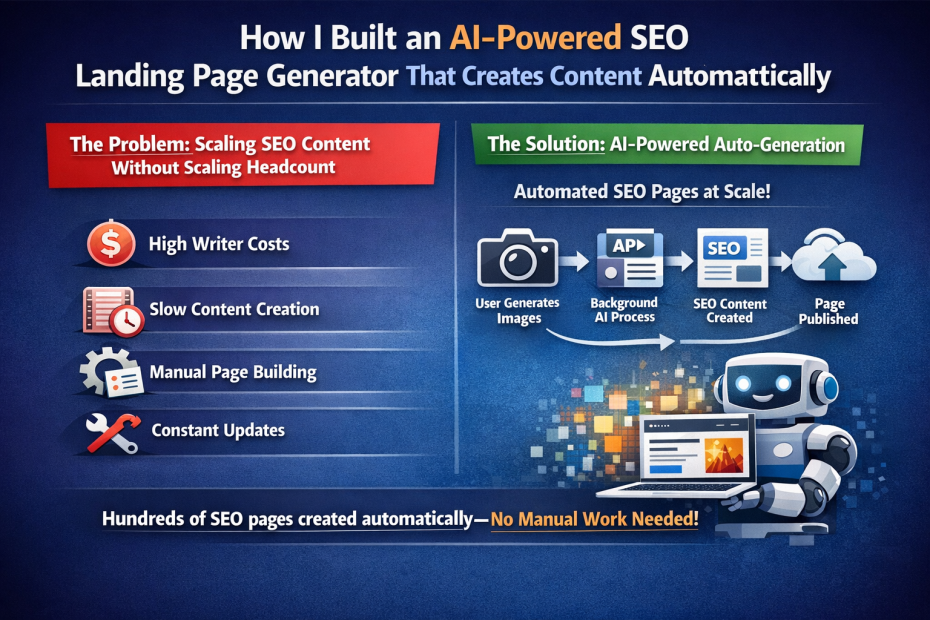
When I launched Shot Director, an AI-powered product photography tool, I knew SEO would be crucial for growth. But there was a problem: creating high-quality, SEO-optimized landing pages at scale is expensive, time-consuming, and doesn’t scale well.
Traditional approaches meant:
- Hiring content writers ($50-200 per article)
- Waiting weeks for content creation and approval
- Manually creating pages for each industry/product type
- Constant maintenance and updates
I needed a solution that could create hundreds of landing pages automatically, each optimized for specific keywords, without manual intervention.
The Solution: AI-Powered Auto-Generation
I built a system that automatically generates SEO landing pages every time a free user generates product images. Here’s how it works:
The Trigger
When a free user successfully generates product images through Shot Director, the system:
- Captures the original product image
- Collects all generated images (typically 5 shots)
- Fires off a background API call to generate SEO content
The user experience isn’t affected—this happens asynchronously in the background.
The AI Analysis Pipeline
The system uses Google’s Gemini AI to perform deep analysis:
1. Product Detection & Industry Classification
- Analyzes the source image to identify the product type
- Detects visual characteristics (materials, colors, textures)
- Classifies the industry (jewelry, cosmetics, electronics, etc.)
- Identifies photography challenges specific to that product
2. Shot-by-Shot Rationale Generation
For each of the 5 generated images, the AI creates detailed explanations:
- Shot Concept Name: “Ethereal Morning Glow” or “Bold Studio Contrast”
- Lighting Rationale: Why this lighting approach enhances the product
- Background Rationale: How the environment complements the product
- Composition Rationale: Why this angle and framing work
- Feature Highlight: Which product feature this shot emphasizes
3. Content Generation
The AI generates:
- Hero headlines and subheadlines
- “Why High-Quality Photos Matter” sections
- “Common Photography Challenges” sections
- “How Shot Director Solves These Problems” sections
- Industry-specific FAQs (6-8 questions)
- SEO metadata (titles, descriptions, keywords)
The Technical Stack
Frontend:
- Next.js 16 with App Router
- React 19 with TypeScript
- Tailwind CSS + Radix UI components
- Framer Motion for animations
Backend:
- Next.js API routes for background processing
- Google Gemini AI (gemini-2.5-flash) for content generation
- Sanity CMS for content storage
- Firebase for user management
Key Services:
seoLandingPageService.ts– Core business logicsanityClient.server.ts– Server-side Sanity client with write permissions/api/seo-landing-page– Background processing endpoint
The Architecture
// Simplified flow
User generates images → Background API call → AI Analysis → Content Generation → Sanity Upload
Duplicate Prevention:
- Images are hashed (SHA-256) to prevent duplicate pages
- Industry pages are limited to 3 alternate versions
- Smart slug generation with version numbers
Template System:
The system supports multiple landing page templates:
- Industry: “AI Product Shots for Jewelry”
- Product: “Premium Watch Product Photos”
- Use Case: “Cosmetics E-commerce Photography”
- Style: “Minimalist Product Photography AI”
- Competitor: Comparison pages (added later)
The Content Structure
Each auto-generated page includes:
- Hero Section
- Compelling headline
- Before/after image grid
- CTA buttons
- Original Image Analysis
- What the AI detected
- Visual characteristics
- Photography challenges
- Why AI photography helps
- Shot-by-Shot Breakdown
- Each generated image with rationale
- Creative decisions explained
- Feature highlights
- Content Sections
- Benefits of quality product photos
- Common challenges
- How Shot Director solves them
- Features & Benefits
- 6 key features with icons
- Social proof
- CTAs
- FAQ Section
- Universal FAQs (same on all pages)
- Industry-specific FAQs (AI-generated)
- Footer CTA
- Conversion-focused section
- Multiple CTA buttons
The Sanity Schema
I designed a flexible schema that supports all content types:
seoLandingPage {
  // Core fields
  title, slug, template, industry, productType

  // Images
  sourceImage, generatedImages[] (with rationale)

  // AI Analysis
  imageAnalysis {
    productDetected, characteristics[],
    photographyChallenges[], aiInsight
  }

  // Content
  heroHeadline, heroSubheadline, sections[]

  // FAQs
  faqs[] { question, answer, isUniversal }

  // SEO
  seo { title, description, image, noIndex }
  targetKeywords[]

  // Metadata
  generatedFrom (image hash), isAlternateVersion
}
The AI Prompts
The magic is in the prompts. Here’s an example for image analysis:
Analyze this product image and provide:
1. productDetected: Detailed description
2. characteristics: Array of visual characteristics
3. photographyChallenges: Array of challenges
4. aiInsight: How AI photography helps
5. industry: Industry category
6. productType: Specific product type
For shot rationale:
Given this product image and shot concept prompt, explain:
1. shotConceptName: Catchy name
2. lightingRationale: Why this lighting
3. backgroundRationale: Why this background
4. compositionRationale: Why this angle
5. featureHighlight: What feature it emphasizes
The Results
Since implementing this system:
- Automated Content Creation: Every free user generation potentially creates a new landing page
- SEO Coverage: Pages target long-tail keywords like “AI product shots for jewelry” and “premium watch product photos”
- Zero Manual Work: Content is generated, optimized, and published automatically
- Scalable: Can generate hundreds of pages without additional cost
- Quality: AI-generated content is contextual, relevant, and SEO-optimized
Key Learnings
1. AI Content Quality
The quality of AI-generated content is impressive when you:
- Use structured prompts with clear output formats
- Provide context (industry, product type, challenges)
- Use JSON schema for consistent outputs
- Combine AI generation with templates
2. Background Processing
Never block user-facing operations for SEO generation:
- Use fire-and-forget API calls
- Handle errors gracefully (silent failures)
- Process asynchronously
3. Duplicate Prevention
Hash-based duplicate detection is crucial:
- Prevents spam from repeated generations
- Maintains content quality
- Limits industry page versions
4. Schema Design
Flexible schemas enable future expansion:
- Template system allows new page types
- Modular content sections
- Easy to add new fields
The Code
The core service is surprisingly simple:
export async function createSEOLandingPage(data: {
  sourceImageBase64: string
  generatedImages: Array<{ imageBase64: string; prompt: string }>
}) {
  // 1. Analyze image
  const analysis = await analyzeImageForSEO(data.sourceImageBase64)

  // 2. Check duplicates
  const shouldGenerate = await shouldGeneratePage(analysis.industry, imageHash)
  if (!shouldGenerate.generate) return { success: false }

  // 3. Generate rationales
  const imagesWithRationale = await Promise.all(
    data.generatedImages.map(img =>
      generateShotRationale(data.sourceImageBase64, img.prompt)
    )
  )

  // 4. Upload images to Sanity
  const uploadedImages = await uploadImagesToSanity(...)

  // 5. Generate content
  const pageContent = await generatePageContent(analysis, template)
  const faqs = await generateIndustryFAQs(analysis.industry, analysis.productType)

  // 6. Create document
  await createSanityDocument({ ... })
}
What’s Next
This system is just the beginning. I’m planning to:
- A/B Testing: Test different content variations
- Performance Tracking: Monitor which pages convert best
- Content Refinement: Use conversion data to improve prompts
- Multi-language: Generate pages in different languages
- Dynamic Updates: Refresh content based on performance
Conclusion
Building an AI-powered SEO content generator was one of the most impactful features I’ve added to Shot Director. It solves a real problem (scaling SEO content) with an elegant solution (automatic generation) that improves with every user interaction.
The best part? It’s completely automated. Every free user who generates images is now contributing to our SEO footprint, creating valuable content that helps other users discover Shot Director.
If you’re building a SaaS product, consider how AI can automate your content creation. The tools are there—you just need to think creatively about how to apply them.
Want to see it in action? Check out Shot Director at shotdirector.com and generate some product images. Each generation helps build our SEO presence.